In 2026, eCommerce success isn’t just about having a high-performing Magento Open Source store—it’s about how efficiently your backend operations run, and how ready they are for what’s next. Magento is now part of Adobe Commerce, AI agents are increasingly handling tasks like pricing and merchandising, and buyers expect real-time inventory and order confirmation, not next-day updates. Managing orders, inventory, customer data, and financials manually is no longer viable at this pace. The key to sustaining growth lies in seamless Magento ERP integration, enabling real-time data flow, process automation, and operational efficiency.
But what does eCommerce ERP integration entail in 2026, and why is it more indispensable than ever? This guide dives into the technical and strategic aspects of integrating Magento Open Source with an ERP system—covering the benefits, the step-by-step implementation process, and current best practices, including event-driven sync architecture and AI-ready data governance. Whether you’re dealing with complex inventory management, multi-channel sales, or financial reconciliation, this guide will equip you with the insights needed to streamline operations and drive sustainable growth.
In this blog, we’ll explore-
Table of Contents
Let’s dive deeper into every aspect to give you a complete picture.
What is ERP?
Before diving deeper, let’s first understand what ERP is. Enterprise Resource Planning (ERP) is a centralized system that streamlines and automates business operations—like inventory, order fulfillment, finance, and customer data.
For Magento merchants, ERP integration with their online store helps maintain real-time accuracy across systems, reduce manual work, and improve decision-making.
Key Benefits of Magento ERP Integration
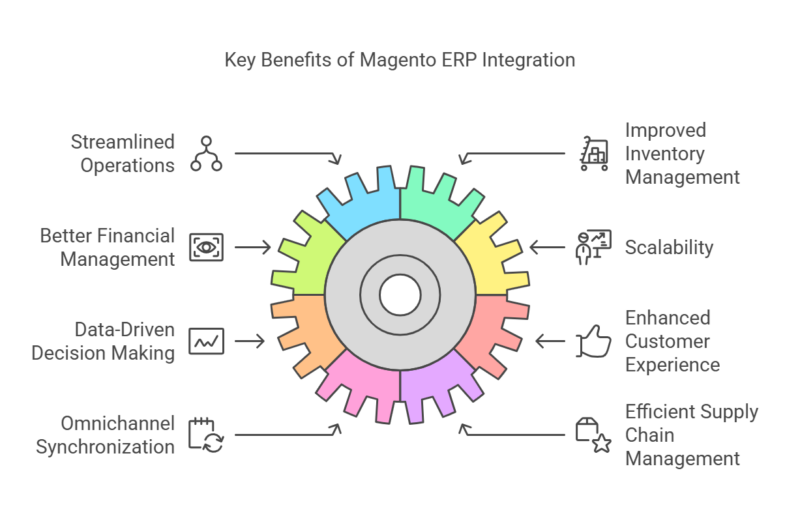
As eCommerce businesses scale, managing inventory, orders, customer data, and financials manually becomes increasingly unworkable — order volumes keep climbing, sales channels keep multiplying, and customer expectations keep rising. This isn’t a niche problem: according to MuleSoft’s 2026 Connectivity Benchmark Report, the average organization now manages 957 applications, yet only 27% of them are actually connected — meaning most businesses are still running critical systems like ERP and eCommerce in disconnected silos. A well-optimized ERP integration closes that gap so your team can focus on growth instead of administrative firefighting. Here’s what it delivers:
- Real-Time Data Synchronization – Inventory, sales, and customer data stay accurate across every platform, preventing overselling, stock discrepancies, and bad demand forecasts — whether you run a single store or a multi-channel setup.
- Enhanced Customer Experience – Real-time stock visibility prevents order cancellations, automated processing speeds up fulfillment, and centralized data enables personalized recommendations and smoother returns.
- Improved Inventory Management – Automated stock-level adjustments based on demand forecasts reduce both stockouts and overstocking, cutting waste and storage costs.
- Omnichannel Synchronization – Product listings, pricing, and orders stay consistent across your website, marketplaces, and social commerce channels, eliminating the inconsistencies that come from managing each one separately.
- Efficient Supply Chain Management – Automated procurement, shipment tracking, and stock optimization based on real-time demand reduce stockouts, cut excess inventory costs, and strengthen supplier relationships.
- Better Financial Management & Compliance – Automated invoicing, expense tracking, and reconciliation reduce accounting errors, while built-in audit trails and tax calculations help meet increasingly stringent compliance requirements.
- Improved Order Fulfillment & Returns – Automated fulfillment reduces shipping errors, and centralized data speeds up return and refund processing while keeping inventory records accurate.
- Data-Driven Decision-Making – Consolidated reporting and analytics surface trends in sales performance, customer behavior, and operational efficiency, informing pricing and retention strategies.
- Scalability – As you add warehouses, sales channels, or new markets, an integrated ERP absorbs the added data volume and workflow complexity without breaking.
- Reduced Operational Costs & Increased Productivity – Automating repetitive tasks cuts manual errors and frees your team to focus on customer service, sales strategy, and growth instead of administrative work.
Types of Magento ERP Integration
| Point-to-Point Integration | Custom-Built Integration | Middleware Integration |
|---|---|---|
| A direct connection between Magento and the ERP system. It’s simple and cost-effective for small businesses but can get tricky as the tech stack grows. | Tailored to your business processes, this option offers maximum flexibility but requires strategic planning and expert development. Something the DotcomWeavers team frequently delivers for growing merchants. | Uses a third-party platform to act as a bridge between Magento and your ERP. It’s scalable, easy to maintain, and ideal for businesses looking to future-proof their architecture. We often recommend this route for businesses with evolving needs and multi-system environments. |
Most Used Magento ERP Integrations
Here are some of the most widely used ERP systems Magento merchants integrate with:
Epicor ERP
Epicor ERPs are widely used in the distribution and building materials industries. Integration with Magento allows:
- Real-time inventory updates and multi-warehouse sync
- Customer-specific pricing, quotes, and order history
- Automated order transfer from Magento to Epicor
- Support for complex shipping, pallet deposits, and freight logic
NetSuite ERP
Ideal for: B2B suppliers, wholesale distributors, and industrial product sellers.
A leading cloud-based ERP that helps businesses scale across eCommerce and retail channels. Magento NetSuite integration supports:
- Bi-directional product, inventory, and customer data sync
- Streamlined order and fulfillment workflows
- Financial and CRM data alignment
- Real-time reporting and analytics
Infor ERP
Ideal for: Mid-to-large-scale B2C and B2B businesses with multi-channel operations.
Infor ERPs are built for the manufacturing, distribution, and service industries. Magento Infor Integration enables:
- Accurate sync of product specs, pricing, and inventory
- Automation of purchase orders and customer invoicing
- Enhanced self-service capabilities for B2B customers
- Complex pricing and tiered discount management
Ideal for: Industrial manufacturers, equipment suppliers, and large-scale B2B companies.
At DotcomWeavers, we’ve helped eCommerce brands integrate each of these ERPs into their Magento stack with minimal downtime and maximum impact.
Step-By-Step Guide to Magento ERP Integration in 2026
Magento ERP integration is a game-changer for eCommerce businesses, but it’s also a complex process that requires careful planning and execution. Below is a step-by-step guide to help you navigate the integration journey. However, if this feels overwhelming, partnering with an experienced eCommerce agency like DotcomWeavers can ensure a seamless and efficient integration process.
What’s new in 2026: Magento is now branded Adobe Commerce, with a newer cloud-hosted option (ACCS) alongside self-hosted deployments. AI agents are increasingly part of the stack for tasks like pricing and merchandising, and a late-2025 vulnerability (CVE-2025-54236, “SessionReaper”) has made secure integration architecture a bigger priority than before.
Step 1: Assess Your Business Needs
Before diving into the technical aspects of ERP integration, take a step back and analyze your business requirements. Ask yourself:
- What operational challenges are slowing down your growth?
- Which manual processes are consuming time and resources?
- Do you need real-time inventory tracking, automated order management, or better financial oversight?
- What are your expansion plans, and how should your ERP system support them?
Understanding these factors helps define your integration goals. However, mapping every business need to ERP functionality can be a daunting task — that’s where DotcomWeavers can help, assessing your needs and customizing a solution tailored to your business.
Step 2: Choose the Right ERP System (SAP, NetSuite, Dynamics & More)
Not all ERP systems are built the same, and choosing the right one is critical for a successful integration. Consider these key factors:
- Compatibility with Adobe Commerce – Ensure the ERP connects seamlessly, whether you’re self-hosted or on the newer Cloud Service (ACCS).
- Scalability – Choose an ERP that grows with your business.
- Features & Functionality – Inventory, financial tracking, CRM, and reporting support.
- AI readiness – Many ERPs now build in AI-assisted forecasting and anomaly detection — worth factoring in if it’s on your roadmap.
- Cost & ROI – A system that provides long-term value without unnecessary expenses.
Popular ERP systems for Adobe Commerce integration include Oracle NetSuite, Epicor ERP, Infor CloudSuite, SAP, and Microsoft Dynamics 365. Choosing the right ERP requires deep research and demos — something DotcomWeavers specializes in, ensuring businesses select the best fit without costly mistakes.
Step 3: Plan the Integration Process
A well-structured plan includes:
- Defining the Scope – Which business functions (inventory, orders, accounting) will be integrated?
- Setting Clear Objectives – Measurable goals like faster order processing or better tracking.
- Creating a Timeline – Milestones to avoid delays.
- Allocating Resources – Clear roles and responsibilities.
Planning an ERP integration is a time-intensive process requiring technical expertise. DotcomWeavers brings years of experience mapping out detailed integration strategies, helping businesses avoid common pitfalls.
Step 4: Use a Reliable Integration Tool, Middleware, or Event-Driven Architecture
Directly integrating Adobe Commerce with an ERP is challenging due to differing data structures. Middleware acts as a bridge between the two. Top options include:
- Celigo – Pre-built integrations with NetSuite.
- MuleSoft – A flexible, API-driven solution for large enterprises.
- Dell Boomi – A cloud-based platform connecting multiple systems.
What’s new in 2026: Traditional integrations sync on a schedule (e.g., every 15 minutes), which is increasingly too slow for buyers expecting instant price and inventory confirmation. Adobe’s own Adobe I/O Events and App Builder framework lets Adobe Commerce fire real-time events straight to your ERP instead of waiting on the next sync cycle — worth evaluating alongside traditional middleware if real-time sync matters to your business.
Step 5: Map Data Fields (SKUs, Customer & Order Data)
Proper data mapping ensures accurate transfer between Adobe Commerce and your ERP:
- Product SKUs – Matching Magento product IDs with ERP inventory records.
- Customer Information – Syncing profiles, purchase history, and shipping details.
- Order Data – Aligning order statuses, invoices, and payment records.
If you’re using event-driven sync (Step 4), map specific events (order placed, inventory reserved) rather than one periodic batch job. Poor data mapping leads to pricing errors and inventory mismatches — DotcomWeavers handles this step with precision.
Step 6: Test the Integration, Including Security & API Endpoints
Before going live, test thoroughly:
- Order Processing Tests – Smooth data transfer from Magento to the ERP.
- Inventory Synchronization Checks – Real-time stock updates.
- Customer Data Validation – Consistency across platforms.
- Security Testing – Given recent Adobe Commerce vulnerabilities, confirm your integration endpoints follow current patching and access-control practices.
DotcomWeavers follows a meticulous testing process to ensure everything runs flawlessly before deployment.
Step 7: Train Your Team
Once live, your team should understand new workflows for order processing and inventory management, know how to generate reports and insights, and be able to troubleshoot common issues. A lack of training leads to errors — DotcomWeavers provides hands-on training and ongoing support.
Step 8: Monitor and Optimize
Integration doesn’t end at go-live. Continuous monitoring should identify data discrepancies, improve performance through updates, and optimize workflows based on real-time insights. DotcomWeavers offers post-integration support to keep your business running at peak efficiency.
Ongoing optimization ensures that your ERP system remains aligned with your evolving business needs.
Challenges of Magento ERP Integration and How to Overcome Them
Migrating data from legacy systems to a new ERP can be challenging. To overcome this, ensure that your data is clean and well-organized before migration.
- Compatibility Issues: Not all ERP systems are fully compatible with Magento. To avoid compatibility issues, choose an ERP system that offers native integration or use a middleware solution.
- Implementation Costs: ERP integration can be expensive, but the long-term benefits often outweigh the initial costs. To manage expenses, consider a phased implementation approach.
- Resistance to Change: Employees may resist adopting a new system. Address this by involving them in the planning process and providing comprehensive training.
How AI Is Changing Magento ERP Integration in 2026
AI is becoming part of the integration itself, not a separate workstream:
- Agentic AI now handles tasks like pricing updates or merchandising in some Adobe Commerce deployments — plan data permissions for these agents as part of your architecture.
- Real-time sync is becoming the expectation over scheduled batch updates.
- Predictive analytics built into modern ERPs can inform how you configure inventory sync rules.
This doesn’t mean every integration needs to be AI-heavy — but it’s worth factoring into your ERP and middleware choice
Why Choose DotcomWeavers for Magento ERP Integration?
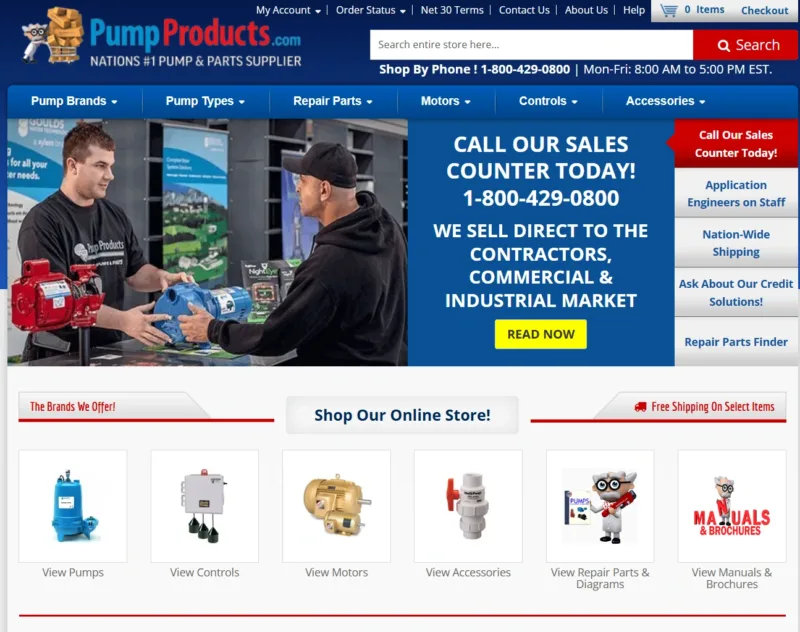
Learn how DotcomWeavers helped Pump Products in Magento ERP integration.
Challenges Faced by PumpProducts
Pump Products’ WordPress site was limiting both customer experience and internal operations. Search was inaccurate, so buyers struggled to find specific parts. Slow page loads drove up bounce rates and cost sales, and inefficient navigation made product information hard to reach. Behind the scenes, outdated data management slowed operations. The site also lacked the B2B and B2C features needed to engage and convert both customer types.
Solution Provided by DotcomWeavers to PumpProducts
DotcomWeavers migrated Pump Products from WordPress to Magento Open Source and built a custom ERP integration to streamline product management. To help buyers find the right part faster, the team enhanced the parts finder and developed interactive machine diagrams that let users see components in context and add them straight to the cart. Custom B2B features and sales workflows were added to support trade customers alongside retail buyers.
TechStack DotcomWeavers Used in the Process
- Platform: Magento Open Source
- Integration: Custom ERP integration, multichannel integration
- Search and discovery: AI-powered search, advanced parts finder, interactive diagrams
- Commerce features: B2B commerce and sales workflows
- Experience: Conversion-focused UI/UX
Results After Our Solution
- 30% higher conversions
- 20% lower bounce rate
- 20% increase in average order value
- Real time order shipping update
- Custom pricing for each user
- Increased employee efficiency
To Wrap Up,
Magento ERP integration is no longer just an option—it’s a necessity for eCommerce businesses looking to stay competitive in 2026. As online operations grow more complex, you can integrate the Magento ERP system yourself or take the help of a certified Magento open source development service provider like DotcomWeavers.
From inventory management to financial reporting, a well-executed ERP integration empowers businesses to scale efficiently while minimizing manual effort and errors.
Our expertise goes beyond just ERP integration—we also offer Magento Managed Support to ensure your store stays secure, up-to-date, and optimized for peak performance. This includes regular security patch updates, performance enhancements, and ongoing technical support.