
Magento built its reputation on one thing: control. It gave brands the power to shape every layer of their store, from server configuration and database logic to checkout flows and custom features. For years, that control felt like a competitive advantage. If you had the right developers and the right budget, you could build almost anything.
But in 2026, the rules of commerce have changed. Brands are no longer competing just on features; they’re competing on speed, experience, and execution. Most businesses don’t want to manage servers, chase security patches, plan painful upgrades, or rely on developers for every small business change. They want platforms that move as fast as their market does. They want predictable costs, built-in performance, and systems that work without constant technical firefighting.
That shift is exactly why the Magento to Shopify migration has exploded. Not because Magento suddenly became “bad,” but because the business world moved forward. Commerce today is faster. It’s more competitive. It’s global by default. And it’s driven by customer experience, not backend complexity.
Shopify, and especially Shopify Plus, was built for this new reality. It removes friction from operations, shortens time to market, and lets brands focus on growth instead of infrastructure. This guide will walk you through everything you need to know before moving from Magento to Shopify in 2026, how the platforms really compare, what migration actually costs, how to protect your SEO, how data moves, what happens to performance, where brands fail, and how to get it right the first time.
Magento vs Shopify: Core Platform Differences Explained
Magento vs Shopify: Core Platform Differences Explained
Before you even think about migration, you must understand what you’re leaving and what you’re moving to.
Architecture: Control vs Convenience
You are responsible for how your store runs. Hosting, scaling, performance tuning, security patches, and upgrades are either your problem or your agency’s problem. Nothing is automatic.
Shopify is SaaS. The infrastructure is invisible to you. Traffic spikes, server loads, DDoS protection, and global CDN, Shopify handles it all. You never think about servers. You just sell.
That single difference changes how your entire business operates. Magento makes you part technology company. Shopify lets you stay a retail company.
Development Dependency
Magento stores are development-heavy by nature. Even basic features often require:
- Custom modules
- Extension conflicts
- Version compatibility checks
- Testing after every update
In Shopify, the most common needs, such as reviews, loyalty, subscriptions, upsells, and bundles, are solved with mature, well-supported apps. Custom development still exists, but it is lighter, faster, and cheaper.
Magento teams often plan in weeks or months. Shopify teams plan in days.
Performance Reality
Magento performance depends on your hosting, caching, CDN, database tuning, and development quality. Two Magento stores can perform completely differently depending on who built them.
Shopify performance is standardized. Every store runs on Shopify’s global infrastructure. That means:
- Fast global load times
- Automatic scaling
- Built-in CDN
- Optimized checkout
You can still mess it up with a bad theme or too many apps—but the baseline is much higher.
Security and Compliance
Magento requires constant attention:
- Security patches
- Version upgrades
- Extension vulnerabilities
- PCI compliance management
Shopify is PCI-DSS Level 1 compliant by default. Security updates are automatic. Fraud tools are built in. For most brands, this alone justifies the move.
Cost Structure
Magento costs are fragmented and unpredictable:
- Hosting
- CDN
- Security tools
- Developers
- Upgrade projects
- Emergency fixes
Shopify costs are simple:
- Monthly plan
- Apps
- Transaction fees (if not using Shopify Payments)
That predictability is why finance teams love Shopify.
Why Brands Are Moving from Magento to Shopify in 2026
This migration wave is driven by business pressure, not tech fashion.
The True Cost of Magento
Magento is not just “expensive.” It is unpredictable. A normal year often includes:
- Monthly dev retainers
- Performance optimization projects
- Security audits
- Upgrade planning
- Emergency fixes
One major upgrade can cost tens of thousands of dollars and months of work. Many brands are tired of paying just to stay functional.
Shopify Is No Longer “Small Business Software”
In the past, Magento dominated the enterprise and B2B. Shopify was seen as basic. That gap is gone.
In 2026, Shopify supports:
- Complex catalogs
- International selling
- Multi-currency and multi-language
- B2B and wholesale
- Headless builds
- Massive traffic spikes
Shopify Plus powers some of the biggest brands in the world. The platform has grown up.
Speed Beats Perfection
Markets move fast. If your competitor can launch in two weeks what takes you three months, you are losing money every day.
Magento is slow to change. Shopify is built for speed. That alone is enough reason for many brands to move.
What Actually Moves in a Magento to Shopify Migration
A real Magento to Shopify migration is not just about moving products. It is about transferring the entire commercial history of your business—data that drives sales, SEO, customer trust, and daily operations. If even one major data layer is handled poorly, the new store may look fine but perform badly.
Here’s what truly moves in a proper Magento Shopify data migration—and why each part matters.
A Magento to Shopify migration is not a data dump. It is a structured rebuild of your business engine. When done right, customers don’t even notice you changed platforms—but your team feels the difference immediately.
Magento to Shopify Migration Cost: What Influences Pricing
There is no flat rate for the Magento to Shopify migration services. Anyone who gives you a fixed price without deeply auditing your store is guessing. Migration cost is driven by how complex your business, data, and technology stack actually are.
Here are the real factors that decide what you will pay.
1. Catalog Size and Structure
A store with 500 simple products is a very different project from a store with 50,000 SKUs, thousands of variants, layered attributes, bundles, kits, and configurable products.
- More products mean:
- More data to map and validate
- More images to transfer and optimize
- More chances for mismatches and errors
If your Magento store uses complex attribute logic, it takes extra work to restructure that data into Shopify’s variant system without breaking filters or navigation.
2. Custom Magento Features
Most mature Magento stores are heavily customized. This is where cost grows fast.
If your Magento store includes:
- Custom pricing rules or tiered pricing logic
- Custom checkout flows or validations
- Product builders or configurators
- Advanced promotion engines
- ERP-driven real-time pricing or inventory
…then those features must be rebuilt using Shopify native tools, apps, or custom development. Some features map easily. Others require full custom engineering. The more custom your Magento store is, the more expensive your Shopify build becomes.
3. Data Volume and History
Migration is not just about current products. Many brands want years of order history, customer data, invoices, and records moved over.
Large historical datasets mean:
- Longer migration time
- More testing cycles
- Higher risk of data conflicts
Multi-store Magento setups, multiple currencies, region-specific pricing, and multi-language content add another layer of complexity that directly impacts cost.
4. Design and Experience Requirements
If you’re happy using a standard Shopify theme with light branding, migration is cheaper.
If you want:
- Custom UI/UX
- Conversion-focused redesign
- Mobile-first rethinking
- Headless or composable architecture
…then you are not just migrating—you are rebuilding. Design, UX, and front-end engineering can easily become the largest part of your budget.
5. Integrations and External Systems
Magento often connects to many systems:
- ERP
- CRM
- Accounting
- Shipping
- Marketing automation
Each integration must be rebuilt, tested, and stabilized on Shopify. Some have ready-made apps. Others need custom API work. More systems = more cost.
6. SEO Risk Management
SEO is where cheap migrations destroy businesses.
Preserving rankings requires:
- Full URL mapping
- 301 redirect planning
- Metadata migration
- Schema rebuilding
- Post-launch monitoring
This work is slow, detailed, and critical. Skipping it saves money short-term but costs far more in lost traffic and revenue later.
7. Testing and Quality Control
Proper migration includes multiple test runs, data validation, and end-to-end testing of checkout, payments, taxes, shipping, and integrations. Rushed testing means expensive fixes after launch.
In short, the Magento to Shopify migration cost is driven by how much complexity you’ve built over the years. The simpler your store, the cheaper it is. The more customized and integrated your business is, the more serious the project—and the budget—needs to be.
Magento to Shopify Cost Ranges in 2026: What Those Numbers Really Mean
Price ranges only matter when you understand what you’re actually getting for that money. Two brands can both “pay $10,000” and end up with completely different results—one with a stable, high-performing store, the other with broken data and disappearing SEO.
Here’s what these ranges typically represent in real business terms.
Small Store: $3,000–$7,000
This usually fits brands with:
- Under 5,000 products
- Simple product structures
- Few or no custom Magento features
- Basic design needs
- Minimal integrations
At this level, migration often includes standard data transfer, light theme customization, basic SEO setup, and limited testing. It works for smaller brands—but only if they accept some limits on customization and complexity.
Mid-Size Store: $8,000–$20,000
This is where most serious brands fall. Typically includes:
- 5,000–50,000 products
- Multiple variants and attributes
- Custom Magento logic to replace
- Several third-party integrations
- Strong SEO protection
- Custom design or heavy theme modification
This range supports real engineering, real QA, and real SEO planning. Brands in this bracket usually care about performance, conversions, and protecting organic traffic.
Enterprise / Shopify Plus: $25,000–$80,000+
This is not a “migration.” It’s a full Shopify development service to rebuild.
Usually involves:
- 50,000+ products
- Multi-store or multi-region setups
- Complex pricing rules
- B2B or wholesale logic
- ERP, CRM, and PIM integrations
- Custom checkout and automation
- Advanced SEO and analytics
At this level, migration becomes business infrastructure work. You are rebuilding the engine that runs your revenue.
Why Cheap Migrations Are Dangerous
Low-cost projects usually cut corners in:
- SEO mapping
- Redirect planning
- Data validation
- Testing
- Performance optimization
The result looks fine on launch day—but rankings drop, orders go missing, customers can’t log in, and fixes cost more than doing it right the first time.
In the Magento to Shopify migration, you are not paying for files to move. You are paying to protect your revenue, your traffic, and your customers while changing the core system of your business.
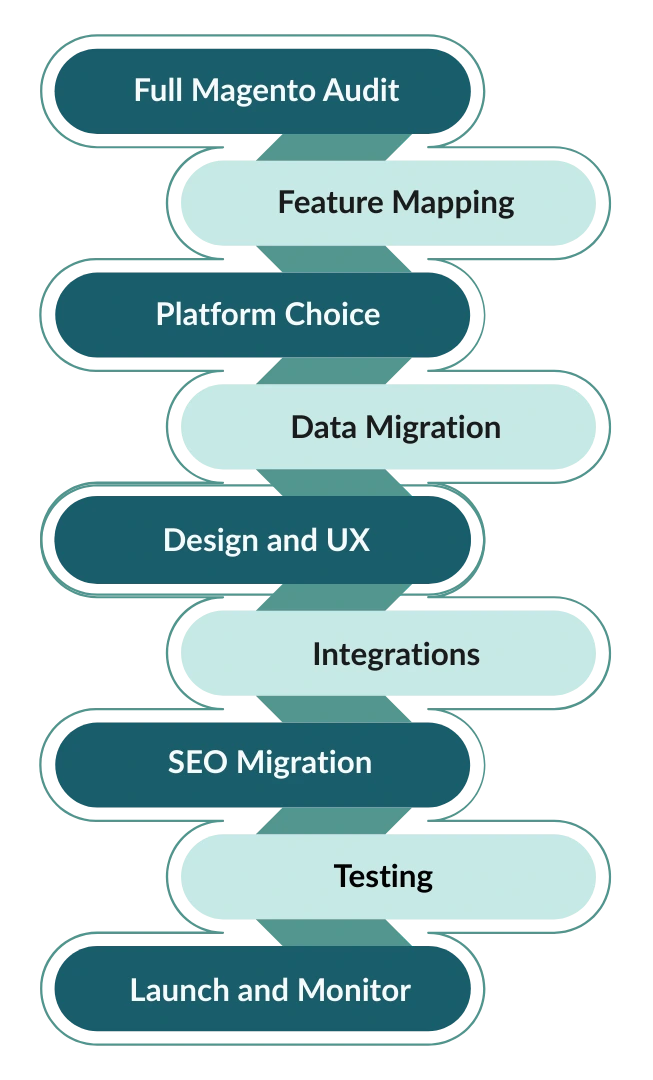
Magento to Shopify Migration: Step-by-Step
Step 1: Full Magento Audit
List every feature, extension, and integration. Decide what to keep, replace, or kill. Migration is the best time to remove years of technical debt.
Step 2: Feature Mapping
Map Magento features to Shopify native features or apps. Do not rebuild what Shopify already does well.
Step 3: Platform Choice
Decide between Shopify and Shopify Plus based on volume, B2B needs, and customization requirements.
Step 4: Data Migration
Migrate products, customers, orders, content, and URLs using tools or custom scripts. Test multiple times.
Step 5: Design and UX
Build a faster, cleaner, mobile-first experience instead of copying your old site blindly.
Step 6: Integrations
Reconnect ERP, CRM, email, shipping, accounting, and marketing tools.
Step 7: SEO Migration
Map URLs, set 301 redirects, move metadata, rebuild schema, and submit new sitemaps.
Step 8: Testing
Test checkout, payments, taxes, shipping, emails, and integrations thoroughly.
Step 9: Launch and Monitor
Watch traffic, rankings, errors, and conversions daily for the first 30–60 days.
This is precisely where platform expertise outweighs tools. Experienced migration teams can anticipate pitfalls, re-engineer data intelligently, and ensure a smooth transition without losing critical business functionality.
Magento to Shopify SEO Migration: Protecting Traffic
SEO is where migrations fail.
URL Integrity Strategy
Keep URLs the same where possible. Where not, redirect every old URL to the closest match.
Metadata Migration
Move title tags, meta descriptions, headers, alt text, and canonicals.
Schema and
Rich Results
Rebuild product, review, and breadcrumb schema.
Post-Launch Monitoring
Use Search Console to catch crawl errors, indexing issues, and ranking drops early.
Magento to Shopify Performance: What Really Improves
One of the biggest reasons brands move from Magento to Shopify is performance. But it’s important to understand what actually improves automatically—and what still depends on how your store is built.
What Improves by Default on Shopify
When you move to Shopify, you instantly get access to enterprise-grade infrastructure without managing it yourself. That means:
- Global CDN delivery so your store loads fast in the US, Europe, Asia—everywhere
- Automatic scaling during traffic spikes, flash sales, or viral moments
- Optimized checkout infrastructure that is already tuned for speed
- Faster server response times compared to most self-hosted Magento setups
- Built-in image optimization and compression
On Magento, performance depends heavily on how well your server is tuned, how good your caching is, and how clean your codebase is. On Shopify, a strong performance baseline is built in.
What Still Depends on You
Shopify does not magically fix bad front-end decisions. You still control the biggest performance killers:
Theme Quality
A poorly built theme with heavy scripts, bloated layouts, and unoptimized images will slow down any Shopify store. A clean, modern, performance-focused theme can easily hit excellent Core Web Vitals scores.
App Usage
Apps are powerful—but every app adds scripts. Too many apps means slower load times, heavier pages, and more chances for conflicts. Smart stores use fewer, better apps and remove anything that doesn’t drive revenue.
Custom Scripts and Tracking
Marketing pixels, analytics tools, chat widgets, personalization scripts, and A/B testing tools all add weight. Performance-focused brands audit scripts regularly and remove anything that doesn’t justify its cost.
What Brands Actually See After Migration
Most brands experience:
- Faster first load times
- Smoother mobile performance
- Better checkout speed
- Higher Core Web Vitals scores
But the biggest gains come when migration is paired with cleanup: removing old scripts, reducing app bloat, simplifying design, and optimizing images.
Good vs Bad Shopify Stores
A good Shopify store is fast because:
- The theme is lightweight
- Apps are minimal and necessary
- Scripts are controlled
- Images are optimized
A bad Shopify store is slow because:
- Too many apps are installed
- Themes are overloaded with features
- Marketing tools pile up without review
- Nobody audits performance
Magento to Shopify gives you a faster engine. Whether you actually go fast depends on how you drive it.
Magento Shopify Data Migration: Risks and Reality
Data migration is where most Magento to Shopify projects succeed or completely fall apart. The front end can look perfect, but if the data behind it is wrong, your business will feel broken from day one.
These are the real risks—and what they actually mean for your business.
Missing or Incomplete Orders
Order history is not just for reference. It powers customer accounts, customer support, analytics, refunds, accounting, and loyalty programs.
When orders go missing or lose details like line items, taxes, or shipping data, teams can’t answer customer questions, customers lose trust, and financial records become unreliable.
Broken URLs and Lost Traffic
If product, category, blog, or landing page URLs are not mapped correctly, Google will treat them as gone. That means:n- Rankings dropn- Traffic disappearsn- Revenue followsn301 redirects must be planned carefully. Every important old URL needs a clear destination, not a generic homepage redirect.
Lost or Broken Customer Passwords
Magento and Shopify encrypt passwords differently. If migration is handled poorly, customers will be forced to reset passwords or may not be able to log in at all. That leads to:n- Frustrated customersn- Support overloadn- Abandoned accountsnGood migrations use secure token-based methods so customers can log in smoothly.
Duplicate or Corrupt Content
Poor migrations create duplicate products, pages, or URLs. This confuses customers and search engines. Google may index the wrong versions, hurting rankings and authority.
Incorrect Product Logic
Attributes, variants, pricing tiers, and inventory rules can break during migration. Products may show wrong prices, missing options, or incorrect stock levels—leading to lost sales and customer complaints.
How to Reduce These Risks
Test Migrations
Never migrate once. Run multiple test migrations in a staging environment. Compare Magento data with Shopify data and fix mismatches early.
Data Validation
Check record counts for products, customers, orders, reviews, and pages. Spot-check critical products, high-value customers, and recent orders manually.
Record Sampling
Do not trust tools blindly. Sample data across different categories, price ranges, and dates to ensure accuracy.
Post-Migration Audits
After launch, audit logs, error reports, and customer feedback daily. Fix issues fast before they become business problems.
Magento to Shopify migration is not copying files. It is transferring the history and engine of your business. Treat it casually, and you will feel the damage immediately.
Shopify Plus: When Basic Shopify Isn’t Enough
Basic Shopify and Advanced Shopify work well for many brands—but at a certain scale, they start to feel limiting. That’s where Shopify Plus comes in. Shopify Plus is built for high-volume, high-complexity businesses that need more control, more automation, and more flexibility without returning to the heavy maintenance of platforms like Magento.
What Makes Shopify Plus Different
Higher API Limits
High-volume stores move a lot of data—orders, inventory updates, pricing changes, customer records, and integrations with ERP, CRM, and marketing systems. Shopify Plus offers much higher API call limits, which means:n- Faster sync with external systemsn- Fewer delays in inventory and pricing updatesn- More stable integrations during peak traffic
Automation with Shopify Flow
Shopify Flow lets you automate business processes without custom code. You can build rules like:n- Tag VIP customers automaticallyn- Flag risky ordersn- Route high-value orders for manual reviewn- Trigger internal alertsn- Control inventory workflowsnThis replaces many custom Magento scripts with simple visual automation.
Advanced Checkout Customization
Checkout is where revenue is made or lost. Shopify Plus allows deeper checkout customization using Shopify Functions and extensions. Brands can:n- Add custom logicn- Change validation rulesn- Personalize checkout by customer typen- Support complex promotionsnAll without hacking the core system.
Built-In B2B Capabilities
Shopify Plus includes native B2B features:n- Company accountsn- Custom price listsn- Contract pricingn- Net payment termsn- Bulk orderingnMany brands that once needed Magento for wholesale now run entirely on Shopify Plus.
Multi-Store and Global Expansion
Shopify Plus supports multiple storefronts for different regions, brands, or business models. Combined with Shopify Markets, you can manage currencies, languages, taxes, and duties globally from one backend.
Who Should Choose Shopify Plus
Shopify Plus is ideal if you have:n- $1M+ in annual revenuen- High order volumen- Wholesale or B2B businessn- Complex pricing or automation needsn- Multiple regions or brandsn- Heavy integrations
Magento vs Shopify Plus in Reality
Magento feels powerful but heavy. Every change requires planning, development, and testing. Shopify Plus feels fast and controlled. You still get flexibility—but without the operational drag.
For many brands, Shopify Plus is the point where they get enterprise power without enterprise pain.
Magento to Shopify for B2B
For a long time, Magento dominated B2B eCommerce. It was flexible enough to handle complex pricing, custom catalogs, and negotiated contracts. Shopify, in comparison, was seen as too simple. That is no longer true.
In 2026, Shopify Plus offers native B2B features that cover most real-world wholesale and B2B needs—without the heavy development burden that Magento requires.
Company Accounts and Buyer Management
Shopify B2B allows you to create company profiles with multiple buyers under one account. Each buyer can have their own login, role, and permissions. This mirrors how real B2B organizations operate, where purchasing is often done by teams, not individuals.
Custom Pricing and Contract Terms
You can assign custom price lists to specific companies or groups. This supports:n- Negotiated contract pricingn- Tiered pricing by volumen- Customer-specific discountsn- Region-based pricingnPrices are automatically shown when the buyer logs in, removing the need for manual quotes on standard orders.
Net Payment Terms
B2B buyers often don’t pay upfront. Shopify Plus supports net terms like Net 30, Net 45, or Net 60. Orders can be placed and invoiced while payment is collected later—just like traditional wholesale operations.
Bulk Ordering and Fast Reordering
B2B buyers want speed, not browsing. Shopify B2B supports bulk ordering, quick order forms, and reordering from past purchases. This makes large, repeat orders faster and reduces friction for loyal buyers.
Catalog Control by Customer Type
You can control which products, collections, and prices different companies see. Retail customers and wholesale buyers can use the same site—or separate storefronts—while seeing completely different catalogs and pricing.
How This Compares to Magento B2B
Magento offered flexibility but required heavy customization, extensions, and ongoing development to run B2B properly. Every pricing rule, account structure, and workflow often needed custom code.
Shopify Plus delivers most of this natively, with automation through Shopify Flow and integrations through APIs. That means- Faster setup- Lower development cost- Easier changes- Fewer things to break
Why B2B Brands Are Leaving Magento
B2B brands are moving because they want: Faster onboarding of new buyers- Easier pricing updates- Better mobile experience- Lower maintenance costs- Fewer technical headaches
Many brands that once needed Magento for B2B now run entirely on Shopify Plus—proving that enterprise B2B no longer requires enterprise-level pain.
Magento vs Shopify: Final Verdict
Magento and Shopify are built on different philosophies. Magento offers deep control and flexibility, which has made it a strong choice for complex, custom-heavy businesses for many years. Shopify, on the other hand, is built for speed—speed to launch, speed to change, speed to scale.
In 2026, most businesses are prioritizing execution over complexity. They want to move faster, test faster, expand faster, and adapt without long development cycles. That’s why many brands are choosing to move from Magento to Shopify—not because Magento failed, but because business priorities have shifted.
This is not about which platform is “better.” It’s about which platform fits the way your business needs to operate today.
Final Thoughts: What This Migration Really Means
Magento to Shopify migration is not a technical copy-paste. It is a strategic rebuild of how your business runs online for the next five years.
Done right, it gives you:
- Faster site performance
- Lower and more predictable operating costs
- Stronger SEO stability
- Easier feature launches
- Better customer experience
- Less technical dependency
Done poorly, it leads to:
- Lost rankings
- Broken data
- Frustrated customers
- Revenue loss
This is not a tech decision. It is a business decision.
How DCW Helps You Migrate the Right Way
At DotcomWeavers (DCW), Magento to Shopify migration is not treated as a “platform switch.” It is treated as a business transformation project—where technology supports growth, not slows it down.
DotcomWeavers, a Shopify partner, helps brands by:
Strategic Planning First
- Auditing your current Magento store
- Identifying what should move, change, or be removed
- Mapping business goals to Shopify capabilities
Clean and Accurate Data Migration
- Products, customers, orders, content, and SEO data
- Multiple test migrations before final launch
- Data validation and quality checks
SEO-Safe Migration
- URL mapping and redirect planning
- Metadata and schema rebuilding
- Post-launch SEO monitoring
Performance-First Build
- Lightweight, conversion-focused UX
- App and script optimization
- Speed and Core Web Vitals focus
Enterprise and B2B Expertise
- Shopify Plus implementations
- B2B and wholesale builds
- ERP, CRM, and system integrations
DCW doesn’t just move your store. It rebuilds your commerce engine so it runs faster, cleaner, and more profitably, long after migration day is over.
About the Author: Karan

Receive a Personalized Consultation for Your eCommerce Requirements!
Receive a Personalized Consultation for Your eCommerce Requirements!